Showing posts with label Malaysia. Show all posts

Sunday, 4 December 2011

iPhone 4S's release date in Malaysia has been announced!

IT'S OFFICIAL! IT'S 16TH OF DECEMBER 2011 :D

GET ONE iPhone 4S FOR YOURSELF! :DDDD

Monday, 3 October 2011

Win Premier Tickets to Real Steel, the Movie!


Hey friends! If you live in Malaysia and you LOVE Hugh Jackman aka.... WOLVERINE... you might just wanna watch REAL STEEL. Yeap, it's his very new movie.


WOOHOO WOLVERINE <3 He is the LOVE :)

Alright, back to main topic. So I guess you want the PREMIER tickets to his movie? Sure? :) 
The details are as follow :

COMPETITION -
Sponsored by Tunetalk

What to do?
Send in an email to mat.tune@tunetalk.com with the subject "Real Steel Premier Tickets - I want!" <-- Remember, this is the MOST crucial part. The content can be ANYTHING :)) One person per entry.

How to win?
One person will be chosen for every 50 emails sent in. THAT'S ALL :)

When does it end?
7th of October, 12pm 

SCREENING -
Date : 9th October 2011
Time : 9pm
Venue : Pavilion, KL

For more details please view this video :


GOOD LUCK TO ALL OF YOU!

And of course..
THANK YOU VERY MUCH TO :


Thursday, 18 August 2011

Samsung Galaxy Tab 10.1 For As Low As RM99?!


Celcom is having a package launch this SATURDAY (20/8/2011) at several locations! As you have alreadyyyyy guessed, yes, in the 3 big cities : KL, JB and Penang :)
Here are the event details :
Piazza, e@Curve, Mutiara Damansara KL
Date : 20th August 2011
Time : 10am onward
- 1st 300 customers can enjoy the Galaxy Tab 10.1 @ the amazing offer price of RM999!*
- 20 lucky customers will be able to get it @ an even more fantastic offer price of RM99!*
*Subject to 24-months contract on Celcom Broadband Basic or Advance. Terms and conditions.
Queensbay Mall, Penang
Date : 20 August 2011
Time : from 10am
- 1st 50 customers can enjoy the Galaxy Tab 10.1 @ the amazing offer price of RM999!*
*Subject to 24-months contract on Celcom Broadband Basic or Advance. Terms and conditions.
Celcom branch, Jalan Kempas, Johor Bahru
Date : 20 August 2011
Time : from 10am
- 1st 50 customers can enjoy the Galaxy Tab 10.1 @ the amazing offer price of RM999!*
*Subject to 24-months contract on Celcom Broadband Basic or Advance. Terms and conditions.
The Samsung Galaxy Tab 10.1 promo price is tied with 24 months contract of Celcom Broadband Basic or Advance.
I'm currently oh-so-tempted. Grr. But the problem is 24 months contract.. uhh.. really? :( 
Should I go?! :( I don't wanna be tied with dumb contracts >.< The Curve is reallllly far though :( Any suggestions anybody? 


LOOK AT THE BABY :

Someone decide it for me, please? :(

Friday, 22 July 2011

Great Day - The Malaysian Movie.

Yeap, today I'm blogging about a local movie called Great Day.
(天天好天)

I watched this movie last night at home alongside with my mum, god brother, boyfriend, and I. 

Spoiler alert : Do NOT scroll down if you do not wish to be "spoiled"


Synopsis of the movie :
Two fathers, Uncle Lim and Uncle Lam live in an old folks' home. Uncle Lim is Hokkien while Uncle Lam is Cantonese. Apart from integral differences of different dialects, (e.g. fighting over Wah Lai Toi and Hua Hee Tai), they always argue about whose children has done better and how filial piety they have been.

While Uncle Lim thinks he may have gotten cancer and don't have much opportunities to see his children again, and aggravated by an argument, the two men decided to escape from the old folks' home to find their children and bring back evidence so the rest of their friends can judge whose children is better. While trying to escape, Uncle Lam hurt his leg leaving Uncle Lim to continue his journey alone. 

Ah Hock is a widower who treasures family relationship very well, when he has free time, he will bring his son Ah Boy to KL to visit Ah Hock's mother who lives with his cousin Liu Duo Hao and needs a better medical treatment as she is becoming more and more forgetful. 

With help from Ah Hock, Uncle Lim reached KL but surprised to find that it is now an unfamiliar territory. Uncle Lim has a son and a daughter. They are both facing problems of their own, but had gone to great lengths in trying to hide them from their father and make their father proud of how well they are doing at the same time. 

Together with Ah Hock and his friend Ultraman, Uncle Lim meets Lam Xiao Xun, whom he thinks he's Uncle Lam's son. Lam Xiao Xun however keeps insisting that his father is dead. But after being touched Uncle Lim and Ah Hock about the importance of family relationship, he decided to follow them to the old folks' home all the way back in Perlis. 

The movie ends at the old folks' home with the gathering of everyone. But is Lam Xiao Xun really not Uncle Lam's son?

Movie Review :

Have you realized that I've been using green words for this blog post? :P Haha cut the crap fro now, let's continue with the comments of the movie.

Aside from being really surprised with the talents of Malaysian actors and actresses, the storyline was basically problems that we would normally face in the real society. Great Day reminds us to respect our elders and also to treasure your family members. Aside from family members, the movie emphasizes on human relationships a lot. 

When I was watching the movie, I couldn't help but thought of my father who was living far away from me. No, he's not in old folks' home but he is living alone. Perhaps if he was living in old folks' home he would have more partner, but it would be cruel too. To come and think of it, isn't loneliness even more cruel? You must be thinking why didn't I live with my father. Simple. My parents are divorced and my custody belongs to my mother. I'm not financially supported myself to take care of my father but once I am I will. Not only has this movie made me missed my father a whole lot more, but also reminded me that I should not let him be lonely for the rest of his life.

In the movie, Uncle Lim really reminds me of my father a lot. He cooks for the family, cares for the children and grandchildren. Although he nags and loves to make a lot of fuss with his friends, he is actually very caring and concerned for their feelings. There was a scene in the movie where his little granddaughter, Joey (yes same name with me lol) went all the way to Perlis just to see her grandfather. It may sound simple and somehow corny to you with words but as I watched it, tears glistened in my eyes and eventually flew down my cheeks.

It's a great movie to watch and a lot of morals could be picked up, so make sure let your children watch it instead LOL. 

This is one of the best Malaysian movies that I've ever watched and I must admit that the standard of the movie is quite high.

Here are some of the pictures from the movie adapted from the website : www.greatdaythemovie.blogspot.com


The entire crew of the movie. :) Ohh heartfelt.

Batu Caves' scene. Boosting tourism much :p

The old folks' home scene. 

Rainy day, cloudy day, windy day.. it's still GREAT DAY.

Movie rating : 8.5/10


Tuesday, 19 July 2011

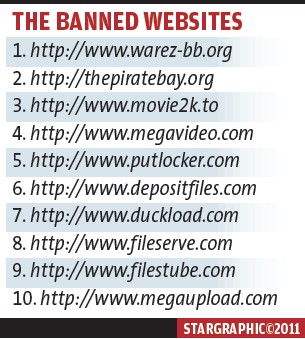
Ten Sites Not Allowed in Malaysia - Let's Undo This! :)

As the title had mentioned, I will be showing all of you on how to undo the ban :). Let's take a look at our ten sites that are not allowed. (Of course there's actually more...)


Ah, miss them much?

If you are still missing your sites, be it piratebay, megaupload and all others, miss it no more because it's allllllll coming back to you ^~^. To explain, we'll all switch our DNS (Domain Name System) to Google's Public DNS.

You may ask : What is DNS? 
The DNS protocol is an important part of the web's infrastructure, serving as the Internet's phone book: every time you visit a website, your computer performs a DNS lookup. Complex pages often require multiple DNS lookups before they start loading, so your computer may be performing hundreds of lookups a day. 

All you have to do is to follow these steps :
Changing DNS server settings on Microsoft Windows 7
Go the Control Panel.
    1. Click Network and Internet, then Network and Sharing Center, and click Change adapter settings.
    2. Select the connection for which you want to configure Google Public DNS. For example:
      • To change the settings for an Ethernet connection, right-click Local Area Connection, and click Properties.
      • To change the settings for a wireless connection, right-click Wireless Network Connection, and click Properties.
      If you are prompted for an administrator password or confirmation, type the password or provide confirmation.
    3. Select the Networking tab. Under This connection uses the following items, select Internet Protocol Version 4 (TCP/IPv4) or Internet Protocol Version 6 (TCP/IPv6) and then click Properties.
    4. Click Advanced and select the DNS tab. If there are any DNS server IP addresses listed there, write them down for future reference, and remove them from this window.
    5. Click OK.
    6. Select Use the following DNS server addresses. If there are any IP addresses listed in the Preferred DNS server or Alternate DNS server, write them down for future reference.
    7. Replace those addresses with the IP addresses of the Google DNS servers:
      • For IPv4: 8.8.8.8 and/or 8.8.4.4.
      • For IPv6: 2001:4860:4860::8888 and/or 2001:4860:4860::8844
    8. Restart the connection you selected in step 3.
    9. Test that your setup is working correctly; see Testing your new settings below.
    10. Repeat the procedure for additional network connections you want to change.


    Changing DNS server settings on Mac OS 10.5


    1. rom the Apple menu, click System Preferences, then click Network
    2. If the lock icon in the lower left-hand corner of the window is locked, click the icon to make changes, and when prompted to authenticate, enter your password.
    3. Select the connection for which you want to configure Google Public DNS. For example:
      • To change the settings for an Ethernet connection, select Built-In Ethernet, and click Advanced.
      • To change the settings for a wireless connection, select Airport, and click Advanced.
    4. Select the DNS tab.
    5. Click + to replace any listed addresses with, or add, the Google IP addresses at the top of the list:
      • For IPv4: 8.8.8.8 and/or 8.8.4.4.
      • For IPv6: 2001:4860:4860::8888 and/or 2001:4860:4860::8844
    6. Click Apply and OK.
    7. Test that your setup is working correctly; see Testing your new settings below.
    8. Repeat the procedure for additional network connections you want to change.


Changing DNS server settings on Ubuntu

  1. In the System menu, click Preferences, then click Network Connections.
  2. Select the connection for which you want to configure Google Public DNS. For example:
    • To change the settings for an Ethernet connection, select the Wired tab, then select your network interface in the list. It is usually called eth0.
    • To change the settings for a wireless connection, select the Wireless tab, then select the appropriate wireless network.
  3. Click Edit, and in the window that appears, select the IPv4 Settings or IPv6 Settings tab.
  4. If the selected method is Automatic (DHCP), open the dropdown and select Automatic (DHCP) addresses only instead. If the method is set to something else, do not change it.
  5. In the DNS servers field, enter the Google Public DNS IP addresses, separated by a space:
    • For IPv4: 8.8.8.8 and/or 8.8.4.4.
    • For IPv6: 2001:4860:4860::8888 and/or 2001:4860:4860::8844
  6. Click Apply to save the change. If you are prompted for a password or confirmation, type the password or provide confirmation.
  7. Test that your setup is working correctly; see Testing your new settings below.
  8. Repeat the procedure for additional network connections you want to change.


As you may already have realized, these procedures are copied directly from Google Public DNS help. I've found this useful, so I've decided that it would be good to share~ <3 Now I can access to all websites that are supposed to be banned from the country. :) You can do it too! Just follow the instructions~!

A little demo that I'm doing on my desktop with Windows Vista :


Go into your control panel. Notice the Network and Internet? Click on View network status and task

and this will pop up : 


Click on View status and then this will pop up :


Now, click on Properties. The shield beside properties represent the permission from administrator, click continue and this will pop up :


Click once on Internet Protocol Version 4 (TCP/IPv4) and then click on Properties then it would open up to :


Note : If you have any DNS server ALREADY, please write it down somewhere and save it down if you want to switch back to your ISP's DNS in future.

If you are obtaining DNS automatically, click on Use the following DNS server addresses

Key in 8.8.8.8 or 8.8.4.4 like this :


Of course, after keying in, press OK!

And...... that's it! You can close any other windows there are and you're done! :) It's that simple, isn't it? Just give it a try, after you've changed to your new DNS, try going into Megaupload.com or any other banned sites, you can now access to it :P

Leave me a comment or so if you still do not know how to do it, I'll try my very best to help you out! :)